

On this page
You can now turn a lecture into notes from a recording, an audio or video upload, or a YouTube link. When transcription finishes, lectures get AI section titles, and you can edit the transcript in a section editor. Saving those edits refreshes topics so they stay in line with the corrected notes. Study podcasts are better too: they open with a new intro that names the topic, there is a preview, they work on mobile, and both quizzes and podcasts now count toward your study streak.
Here is what we added, feature by feature.
Turn a lecture into notes
You can record a lecture, upload an audio or video file, or paste a YouTube link, and Eduloo turns that into notes.
We also added sub-tabs to the audio and video panel, so the recording side of the same workspace is easier to move around in. And when something does not go through the first time, there is a retry button.
The path is:
- Record or upload. Record a lecture, upload an audio or video file, or paste a YouTube link.
- Correct the transcript. Lectures get AI section titles when transcription finishes, and you can fix the transcript in a section editor.
- Refresh topics when you save. Saving stores the text. If topics already exist, Eduloo asks first, then rebuilds the lecture and removes the old topics.
Note: The transcript is the source for everything that comes next, so it has to be yours to correct.
Edit the transcript, with AI section titles
Lectures now get AI section titles when transcription finishes, and you can fix the transcript in a section editor. You can:
- Find and replace across the transcript.
- Edit a passage in place.
- Split a section, or merge two together.
- Rename a section.
- Auto-split a long section.
Topics refresh when you save
When you save an edited transcript, Eduloo stores the text. If that lecture already has topics, it asks first. After you confirm, it rebuilds the lecture straight away and removes the old topics.
Generate Topics only runs the topic scan. Topic cards are titled by lecture section, and a long section is labelled in the form "Title (part 2)". Lectures that do not have a source URL open as text on the app topics page.
Heads up: A "topics out of date" notice and an Edited badge stay on the lecture until you generate topics again. The topics button pulses until that happens, so it is obvious the notes have moved on and the topics have not caught up yet.
Better study podcasts
Podcasts used to start with a generic "welcome to the show" style intro.
They now open with "Hi, eduloo presents," followed by the topic name.
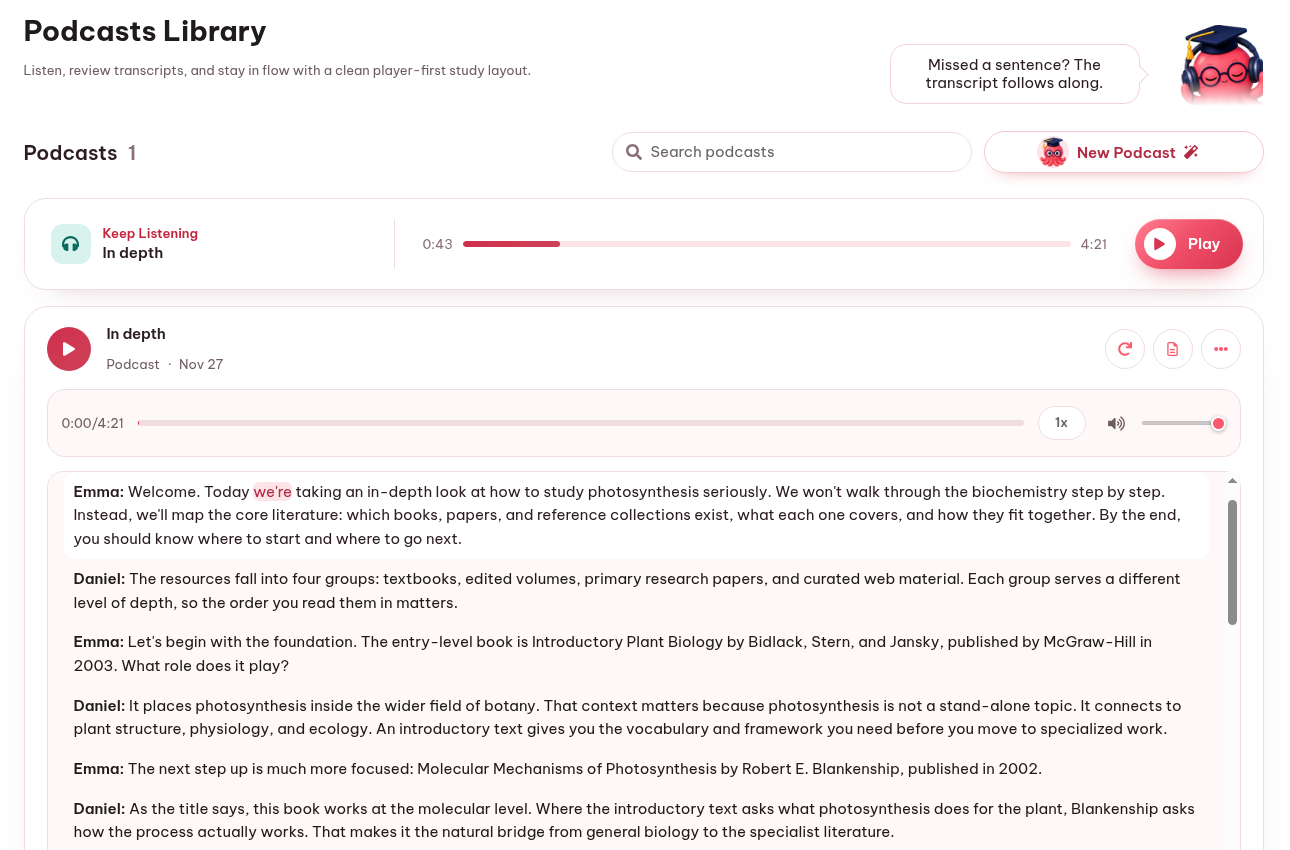
It is a small change, but it is the first thing you hear, and it should name what you are actually about to study.
There is also a podcast preview, so you can hear what you are getting before you settle in. Voice preview in the create flow was cleaned up too, including cases where a preview kept playing after the dialog closed, or the voice switch did not follow the voice you had just picked. If a podcast cannot be made right now, the app tells you why, instead of failing quietly. And podcasts are on mobile, so this does not have to be a desktop-only habit.
| Piece | Before | Now |
|---|---|---|
| Opening line | A generic "welcome to the show" style intro | Hi, eduloo presents, followed by the topic name |
| Study streak | Quizzes and podcasts did not keep the daily streak | Finishing a quiz, or listening to a podcast, keeps the streak |
Quizzes, podcasts and your study streak
Finishing a quiz now keeps the daily streak. Listening to a podcast counts as study time and keeps the streak as well.
If you have a lecture recording, a file, or a YouTube link ready, try the new path in Eduloo, and listen on Eduloo podcasts when you want the same material as audio.
Frequently asked questions
Yes. You can record a lecture, upload an audio or video file, or paste a YouTube link, and Eduloo turns that into notes.
Eduloo stores the text. If that lecture already has topics, it asks first. After you confirm, it rebuilds the lecture and removes the old topics. A "topics out of date" notice and an Edited badge stay on the lecture until you generate topics again.
You can find and replace across the transcript, edit a passage in place, split a section or merge two together, rename a section, and auto-split a long section.
They now open with "Hi, eduloo presents," followed by the topic name. There is also a podcast preview, and podcasts are on mobile.
Yes. Finishing a quiz now keeps the daily streak. Listening to a podcast counts as study time and keeps the streak as well.
If a podcast cannot be made right now, the app tells you why, instead of failing quietly.